How to Make the Burning Bridges AI Video
Make the Burning Bridges AI party video from one photo. Pick 15 or 28 seconds, add up to 3 friends, and post it with the sound on TikTok or Reels.
Quick answer
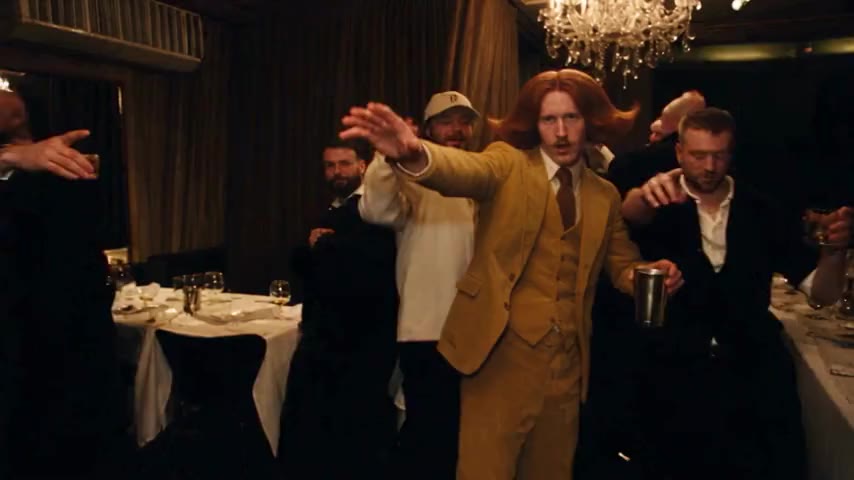
To make the Burning Bridges AI video, upload one clear photo of yourself to the Burning Bridges AI Video Generator, add up to 3 friends if you want them in the crowd, pick 15 seconds or the full 28 seconds, and press Generate. ZapVid puts you at the center of the chandelier party with the silver shaker, the crowd and the handheld camera moves of the original scene. A 15-second video takes 5 to 7 minutes and uses 100 credits. You do not write a prompt or edit anything.
What is the Burning Bridges AI trend?
It comes from the party scene in Drake's Burning Bridges music video, released on May 15, 2026. About two and a half minutes in, the video cuts to a dark room lit by crystal chandeliers: the lead walks through a packed crowd with a silver cup, plays to the handheld camera, and the room reacts around him.
In late September 2026, people started using AI video tools to put themselves, their friends and all kinds of characters into that scene instead of Drake. The clips spread on TikTok, Instagram Reels and X under the name Burning Bridges AI. You get the biggest laugh when the lead looks like they do not belong at that party.
How do I make it step by step?
- Open the generator. Go to the Burning Bridges AI Video Generator. The template is ready to go.
- Upload your photo. One person, face fully visible, waist up works best. You are the lead, and your outfit carries over into the video.
- Add friends, or skip it. Under More options, add up to 3 friend photos. Each one replaces a person in the crowd, in the order you upload them. You can also add a photo of a place and the room takes on its look.
- Pick length and quality. 15 seconds is the best-known part. The full 28 seconds is the whole party scene. 480p is the default and 720p HD is sharper.
- Press Generate. A 15-second video is ready in 5 to 7 minutes and the full 28 seconds in 7 to 10 minutes. You can close the page and find it later under My videos.
- Download and post. Save the MP4 and add the Burning Bridges sound when you post (see below).
You never write a prompt. The template already has the walk in, the shaker, the turn to the crowd and the camera moves.
How do friends work in the Burning Bridges video?
Each friend photo takes the place of someone already in the crowd, so the party keeps its size. Friend photos cost no extra credits. The lead looks the most like your photo. With several people on screen the AI can mix faces as the camera moves, so friends may only partly resemble their photos. Clear, front-facing pictures help, but they do not guarantee a match.
What photo gives the best result?
- Your photo: one person, face clear and not covered, good light, no heavy filters. A selfie or a waist-up photo both work.
- Friend photos: one friend per photo, face to the camera. Do not crop a friend out of a group photo where faces are tiny.
- Avoid: group photos as your main photo, full-body shots where the face is very small, dark or blurry images, and photos of anyone who did not agree to be in the video.
How do I add the Burning Bridges sound?
The video downloads without music, so you add the official sound inside the app:
- TikTok: upload the video, tap Add sound, search "Burning Bridges", pick the version the trend uses, and lower the original volume to zero.
- Instagram Reels: upload the video, tap the music icon, search "Burning Bridges", and line it up with the walk in.
With the official sound, TikTok lists your video on the trend's sound page next to everyone else's.
Burning Bridges AI template, meme and prompt
Searched for a "Burning Bridges AI template" or a "Burning Bridges AI prompt"? The template on ZapVid covers both: the scene, the moves and the prompt are already set up, so you only upload a photo. Want a meme or gif version? Once you have your MP4, trim the walk in or the turn to the crowd into a few seconds with any free gif converter.
Is it free?
No, but you only pay for videos you get. A 15-second video uses 100 credits in 480p or 300 credits in 720p HD. The full 28 seconds uses 300 credits in 480p or 600 credits in 720p HD. A credit pack costs $9.99 for 100 credits, and plans start at $15.99 a month on yearly billing for 300 credits a month. Friend and place photos are free. If a video fails, the credits come back to your account automatically.
FAQ
How long does the Burning Bridges AI video take? A 15-second video is ready in 5 to 7 minutes. The full 28-second scene takes 7 to 10 minutes.
Can I add my friends to the Burning Bridges video? Yes. You can add up to 3 friend photos, and each one replaces a person in the crowd. Friends are optional and do not cost extra credits, but they may only partly resemble their photos.
Is the video landscape or vertical? It is landscape 16:9, the same shape as the original music video scene. TikTok and Reels show it with bars above and below, the same way the trend videos look.
Does the video come with the song? No. Videos have no sound, and we do not play or distribute the song. Pick the Burning Bridges sound in TikTok or Instagram when you post.
Do I need a prompt? No. The scene, the moves and the camera are already set up in the template. You upload a photo and press Generate.
Can I use a photo of Drake or another celebrity? No. Only use photos of yourself or of adults who agreed. We block photos of celebrities and public figures. Label the video as AI-generated when you post.
Is this affiliated with Drake? No. ZapVid is an independent tool and is not affiliated with Drake, his record labels or any other rights holder.