How to Make the Crazy Frog AI Video (Invisible Moped Trend)
Make the Crazy Frog AI video from one photo. Ride the invisible moped down the overpass with a friend chasing you, then add the sound when you post.
Quick answer
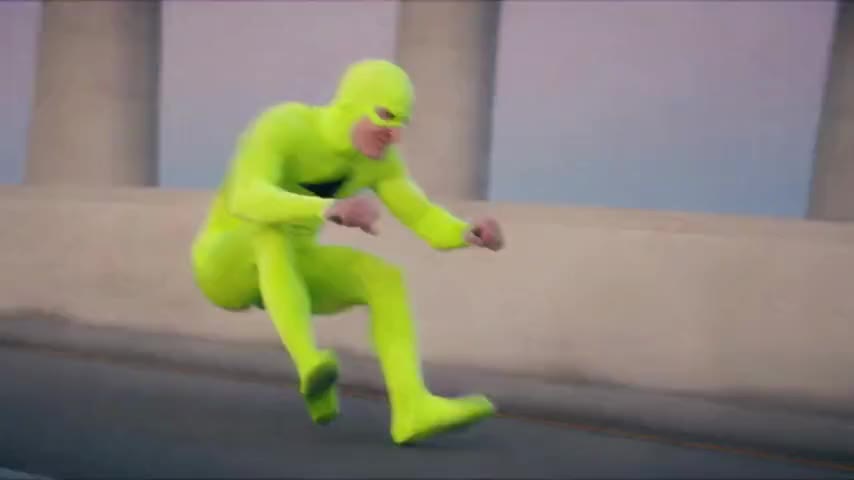
To make the Crazy Frog AI video, upload one clear photo of yourself to the Crazy Frog AI Video Generator, add a friend photo if you want them as the chaser, and press Generate. ZapVid makes a 14-second horizontal video of you squat-riding an invisible moped down a highway overpass, chased by someone on a hover-bike, with a flip at the end. It takes 5 to 10 minutes and uses 100 credits, with or without a friend.
What is the Crazy Frog AI trend?
It copies the 2005 music video for the Crazy Frog version of "Axel F", where an animated frog rides a motorbike nobody can see through the city while a bounty hunter on a hover-bike chases him.
In October 2026 people started recreating that chase with AI and real faces. The earliest version we could find was posted on TikTok on October 7, 2026, and from October 9 more and more people posted their own: squatting in mid-air down a highway overpass, hands on invisible handlebars, with a chaser on a hover-bike right behind them. The rider keeps a straight face the whole time, and that is the joke. You will also see it searched as the invisible moped trend, the invisible motorbike trend or the ring ding ding trend.
How do I make it step by step?
- Open the generator. Go to the Crazy Frog AI Video Generator. The template is already selected.
- Upload your photo. You become the rider on the invisible moped.
- Add a friend as the chaser, or skip it. A second photo puts your friend on the hover-bike. Leave it empty and our security guard chases you.
- Press Generate. The video is ready in 5 to 10 minutes. You can close the page and find it later under My videos.
- Download and post. Save the MP4 and add the Crazy Frog sound when you post (see below).
You don't write a prompt. The template comes with the squat ride, the chase and the flip.
What photo gives the best result?
- One person per photo, facing the camera with the whole face visible.
- Full body works best. The camera shows the rider head to toe in a squat.
- Pick a sharp friend photo. Your friend rides far behind for most of the clip and comes close for a couple of seconds.
- Avoid: heavy filters, tiny or blurry photos, and photos of anyone who did not agree to be in the video.
How do I add the Crazy Frog sound?
The video downloads without music, so you add the sound inside the app:
- TikTok: upload the video, tap Add sound, search "Crazy Frog Axel F", and lower the original volume to zero.
- Instagram Reels: upload the video, tap the music icon, search "Axel F", and line it up with the start of the ride.
Using the trend's sound puts your video on its sound page, next to everyone else's version.
Crazy Frog AI template, meme and original
If you searched for a "crazy frog ai template", the template on ZapVid is a ready-made version of the invisible moped chase that you fill with your own photo. The original is the 2005 "Axel F" music video. Your video has no frog character. It keeps the chase you know from the meme.
Is it free?
A 14-second video uses 100 credits, with or without a friend. A credit pack costs $9.99 for 100 credits, and plans start at $15.99 a month on yearly billing for 300 credits a month. If a video fails, the credits come back to your account automatically.
FAQ
How long does the Crazy Frog AI video take? Most videos are ready in 5 to 10 minutes after you press Generate.
Can my friend be the one chasing me? Yes. Add a second photo and your friend rides the hover-bike as the chaser. Without it, our security guard chases you.
Is this the official Crazy Frog? No. ZapVid is not connected to Crazy Frog or its rights holders. The template only recreates the invisible moped chase from the trend.
Is the video vertical or horizontal? It is a 14-second horizontal (16:9) video.
Does the video include the Crazy Frog song? No. Videos have no sound, and we do not use "Axel F" or any original audio. Pick the sound in TikTok or Instagram when you post.
Can I use photos of celebrities or other people? Only use photos of yourself and of adults who agreed to be in the video. Photos of celebrities and public figures are blocked. Label the video as AI-generated when you post.