How to Make the Hotel Lobby AI Video With a Friend
Make the Hotel Lobby AI video with a friend from two photos. Trade bars on one hanging mic, in vertical or horizontal, and add the sound when you post.
Quick answer
To make the Hotel Lobby AI video, upload a clear photo of yourself and one of your friend to the Hotel Lobby AI Video Generator, pick vertical 9:16 or horizontal 16:9, choose 720p or 1080p, and press Generate. ZapVid makes a 15-second video of you two trading rap lines into one hanging microphone in the orange studio, with the same gestures and mouth timing as the original. It takes 10 to 20 minutes and uses 100 credits in 720p or 200 credits in 1080p.
What is the Hotel Lobby AI trend?
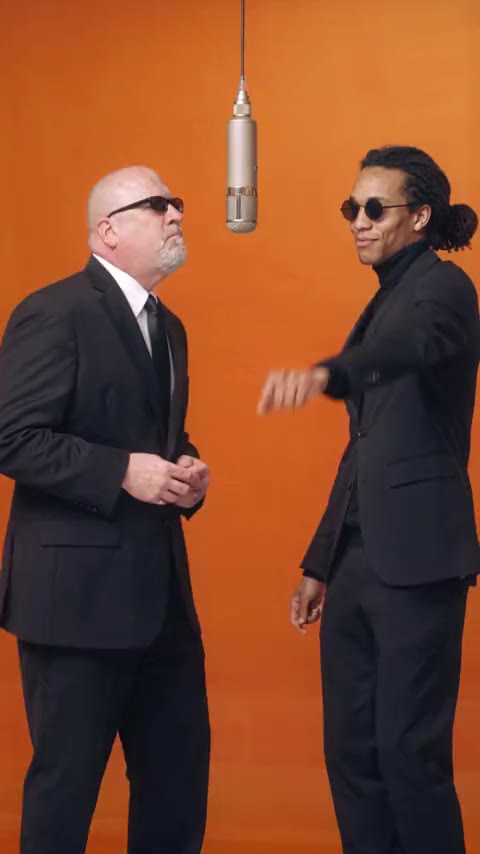
It copies a studio performance of the rap song "Hotel Lobby (Unc & Phew)", posted on YouTube on June 17, 2022. Two rappers stand in front of a plain orange wall and pass the verse back and forth into a single microphone hanging between them.
In September 2026 people on TikTok and Instagram turned the same setup into an AI video trend. They put two other faces in the booth: themselves and a friend, a parent and a kid, a couple, and often two pets. The joke is an unlikely pair delivering the bars with full confidence. People also search it as the Unc and Phew trend or the orange studio rap trend.
How do I make it step by step?
- Open the generator. Go to the Hotel Lobby AI Video Generator. The page opens with the template selected.
- Upload your photo. You take the left spot.
- Add your friend, or skip it. Your friend takes the right spot. Leave it empty and our second AI character stays next to you.
- Pick the format and quality. Vertical 9:16 fills a phone screen on TikTok, Reels and Shorts. Horizontal 16:9 matches the wide framing of the original. Then pick 720p or 1080p.
- Press Generate. The video is ready in 10 to 20 minutes. You can close the page and find it later under My videos.
- Download and post. Save the MP4 and add the Hotel Lobby sound when you post (see below).
You never write a prompt. The template already has the back-and-forth, the gestures and the mouth timing.
What photo gives the best result?
- One person per photo, facing the camera with the face fully visible.
- Waist up or full body works best, because the video shows both of you from head to knees.
- Your clothes carry over. Sunglasses only appear if you wear them in your photo.
- Avoid: heavy filters, tiny or blurry photos, and photos of anyone who did not agree to be in the video.
How do I add the Hotel Lobby sound?
The video downloads without music. The mouths and moves follow the song's rhythm, so add the official sound inside the app:
- TikTok: upload the video, tap Add sound, search "Hotel Lobby", pick the version the trend uses, and lower the original volume to zero.
- Instagram Reels: upload the video, tap the music icon, search "Hotel Lobby", and line it up with the first line.
Hotel Lobby AI template, free and with pets
If you searched for a "hotel lobby ai template", the template on ZapVid is the ready-made booth that you fill with your own photos. Many people search "hotel lobby ai free". The template is paid, a failed video costs you nothing, and the next section lists the prices. Pet versions are popular on TikTok, but we designed this template for people, so we cannot guarantee pet results.
Is it free?
A 15-second video uses 100 credits in 720p or 200 credits in 1080p, with or without a friend, in either format. A credit pack costs $9.99 for 100 credits, and plans start at $15.99 a month on yearly billing for 300 credits a month. If a video fails, the credits come back to your account automatically.
FAQ
How long does the Hotel Lobby AI video take? Most videos are ready in 10 to 20 minutes after you press Generate.
Can I make it with just one photo? Yes. With one photo you take the left spot and our second AI character stays on the right. Add a friend photo to put both of you in the booth.
Vertical or horizontal: which should I pick? Pick vertical 9:16 for TikTok, Reels or Shorts. Pick horizontal 16:9 for the wide look of the original performance. Both cost the same.
Who stands where? Your photo is the rapper on the left. Your friend's photo is the rapper on the right.
Does the video come with the song? No. Videos have no sound, and we do not use the original song. Pick the Hotel Lobby sound in TikTok or Instagram when you post and the lines line up.
Can I use photos of celebrities or other people? Only use photos of yourself and of adults who agreed to be in the video. ZapVid blocks photos of celebrities and public figures. Label the video as AI-generated when you post.