How to Make the Middle Finger Dunk AI Video
Make the Middle Finger Dunk AI video from one photo. Cross over, dunk on a night court and taunt the camera, then post it with the trending sound.
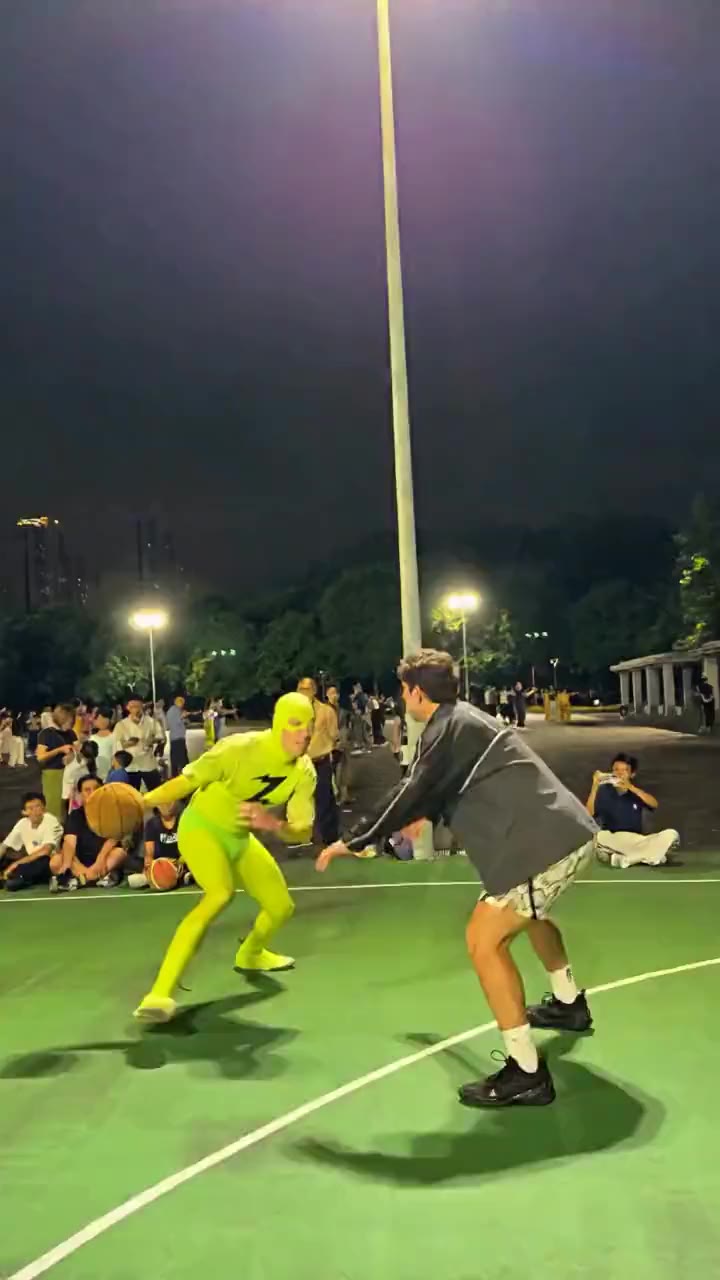
Quick answer
To make the Middle Finger Dunk video with AI, upload one clear photo of yourself to the Middle Finger Dunk AI Video Generator, pick 480p or 720p HD, and press Generate. ZapVid makes a 14-second vertical video of you crossing over a defender, dunking on a floodlit night court and turning to taunt the camera. It takes 5 to 10 minutes and uses 100 credits in 480p or 300 credits in 720p. You do not need a ball, a hoop or any basketball skills.
What is the Middle Finger Dunk trend?
It is an AI video trend from October 2026. The earliest posts we could trace came from @scrambledai, an AI meme account that shared AI parody videos on TikTok on October 22, 2026. You can find the same moves in several settings. The version people copied is set on an outdoor court at night with a packed crowd on the sideline: a crossover, a one-handed dunk, a finger raised at the camera, then a second dunk right over the defender.
From October 23, 2026 people posted remake after remake on X and TikTok, putting themselves and their friends in the dunker role. The joke is the disrespect: someone who has never played basketball posterizes a defender and rubs it in. People also search it as the AI basketball dunk meme or the 1v1 dunk trend.
How do I make it step by step?
- Open the generator. Go to the Middle Finger Dunk AI Video Generator. The page opens with the template selected.
- Upload your photo. One person, face clear, full body if you have it. The dunk shows the player head to toe in the air.
- Pick the quality. 480p is fine for a quick share. 720p HD gives a sharper video.
- Press Generate. The video is ready in 5 to 10 minutes. You can close the page and find it later under My videos.
- Download and post. Save the MP4 and add the trending dunk sound when you post (see below).
You never write a prompt. The template already has the crossover, the dunk, the taunt and the timing.
What photo gives the best result?
- One person only: this template replaces the dunker. The defender stays as in the example.
- Full body or at least waist up, facing the camera in good light. The court is dark, so a bright photo keeps your face clear.
- Your outfit carries over, so wear what you want to dunk in.
- Avoid: heavy filters, tiny or blurry photos, and photos of anyone who did not agree to be in the video.
How do I add the sound?
The video downloads without sound, so you add it inside the app:
- TikTok: upload the video, tap Add sound, search for the dunk trend sound, and lower the original volume to zero.
- Instagram Reels: upload the video, tap the music icon, pick the trending sound and line it up with the dunk.
With the trend's sound, TikTok lists your video on the sound page next to everyone else's version.
Middle Finger Dunk template, meme and meaning
If you searched for a "middle finger dunk template", the template on ZapVid is a ready-made version of the trend that you fill with your own photo. The finger after the slam is the celebration, and rubbing it in the defender's face is the meme. Want a short gif? Trim the dunk and the taunt from your MP4 with any free gif converter.
Is it free?
A 14-second video uses 100 credits in 480p or 300 credits in 720p HD. A credit pack costs $9.99 for 100 credits, and plans start at $15.99 a month on yearly billing for 300 credits a month. If a video fails, the credits come back to your account automatically, so you only pay for videos you get.
FAQ
How long does the Middle Finger Dunk AI video take? Most videos are ready in 5 to 10 minutes after you press Generate.
Do I need to play basketball or film anything? No. One still photo is enough. The AI creates the court, the crowd and the dunk.
Can I put my friend in as the defender? Not yet. This template replaces the dunker only. For group videos, pick a template that shows "YOU + N" on its card, such as No Scrubs or Hotel Lobby.
Is the video vertical? Yes. It is a 14-second vertical (9:16) video, made for TikTok, Reels and Shorts.
Does the video come with sound? No. Videos have no sound. Pick the trending sound in TikTok or Instagram when you post.
Can I use a photo of a celebrity or someone else? Only use photos of yourself or of adults who agreed. ZapVid blocks photos of celebrities and public figures. Label the video as AI-generated when you post.