How to Make the Window Peeper AI Video
Make the window peeper meme with AI from one photo. Get caught mid-bite in the lit window, stare back and pull the curtain shut. No CapCut needed.
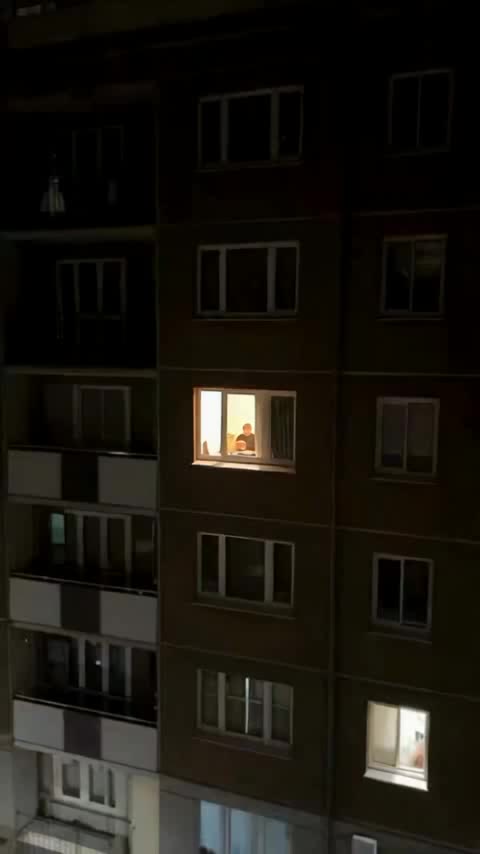
Quick answer
To make the window peeper video with AI, upload one clear photo of yourself to the Window Peeper AI Video Generator and press Generate. ZapVid makes a 15-second vertical video of you in the lit window at night: eating, noticing the camera, staring back far too long, then pulling the curtain shut. It takes 5 to 7 minutes and uses 100 credits. You do not need CapCut, a camera or a burger.
What is the window peeper trend?
@therealrodentspawn posted the earliest widely shared clip on TikTok on October 20, 2026. The 14-second vertical video looks like someone filmed it from the building across the street: a slow zoom from a dark apartment block into the only lit window, where a man sits at a small table with a burger and a takeout bag. He stops chewing, stares straight into the lens, puts the burger down, stands up and yanks the curtain closed.
The caption was "Try this filter yourself", with the tags #capcut, #pioneertemplate and #windowpeeper, and the clip passed 2 million views within four days. The man never says a word. The zoom feels like a horror film, his stare goes on too long, and he gets the laugh when he yanks the curtain. By October 24, 2026 people had posted more than 500 videos under the tag, some with noodles or pizza instead of the burger.
How do I make it step by step?
- Open the generator. Go to the Window Peeper AI Video Generator. The page opens with the template selected.
- Upload your photo. One person, face fully visible, waist up or more works best because the window shows you sitting at the table and then standing up.
- Press Generate. The video is ready in 5 to 7 minutes. You can close the page and find it later under My videos.
- Download and post. Save the MP4 and add the trending window peeper sound when you post (see below).
You never write a prompt. The template already has the night zoom, the bite, the stare and the curtain pull.
Is this the same as the CapCut window peeper filter?
You get the same trend, made a different way. A CapCut template pastes your face onto a fixed clip, so many copies look identical. ZapVid renders the whole scene with you in it, and your face, hair and clothes move with you as you bite, stare and stand up.
What photo gives the best result?
- Your photo: one person, facing the camera, good light, no heavy filters. The stare is the whole joke, so your eyes need to be clear.
- Your outfit: your top half carries over, so wear what you want to be caught in.
- Avoid: sunglasses, group photos, tiny or blurry images, and photos of anyone who did not agree to be in the video.
How do I add the window peeper sound?
The video downloads without sound, so you add it inside the app:
- TikTok: upload the video, tap Add sound, search "window peeper", pick the sound the trend uses, and lower the original volume to zero.
- Instagram Reels: upload the video, tap the music icon, search the same words, and line it up with the stare.
With the trending sound, TikTok lists your video on the trend's sound page next to everyone else's version.
Window peeper meme, gif and template
If you searched for a "window peeper template" or "window peeper filter", the template on ZapVid is a ready-made version you fill with your own photo. Want a gif or meme version? Trim the stare and the curtain pull from your MP4 with any free gif converter. You can also use the stare on its own as a reaction gif.
Is it free?
No, but you only pay for videos you get. A video uses 100 credits. A credit pack costs $9.99 for 100 credits, and plans start at $15.99 a month on yearly billing for 300 credits a month. If a video fails, the credits come back to your account automatically.
FAQ
How long does the window peeper AI video take? Most videos are ready in 5 to 7 minutes after you press Generate.
Do I need CapCut to make the window peeper video? No. You only upload one photo on ZapVid. The AI makes the whole scene, so there is nothing to edit.
Can I put a friend in the window with me? No. The original is one person at the table, so this template has one person. For group videos, pick a template that shows "YOU + N" on its card.
Does the video come with the sound? No. Videos have no sound. Add the trending window peeper sound from the TikTok or Instagram library when you post.
Is the window peeper video real footage? No. The original is a staged comedy bit, and ZapVid makes an AI video with you as the person in the window. Label it as AI when you post, and do not film real people through their windows.
Can I use a photo of a celebrity or someone else? Only use photos of yourself or of adults who agreed. ZapVid blocks photos of celebrities and public figures.