Outstanding Tiny Desk AI Template: 3 Shots, 5 Spots, No CapCut
The Outstanding Tiny Desk AI template shot by shot. Which friend appears where, who gets a close-up, and how an AI template differs from a CapCut one.
Quick answer
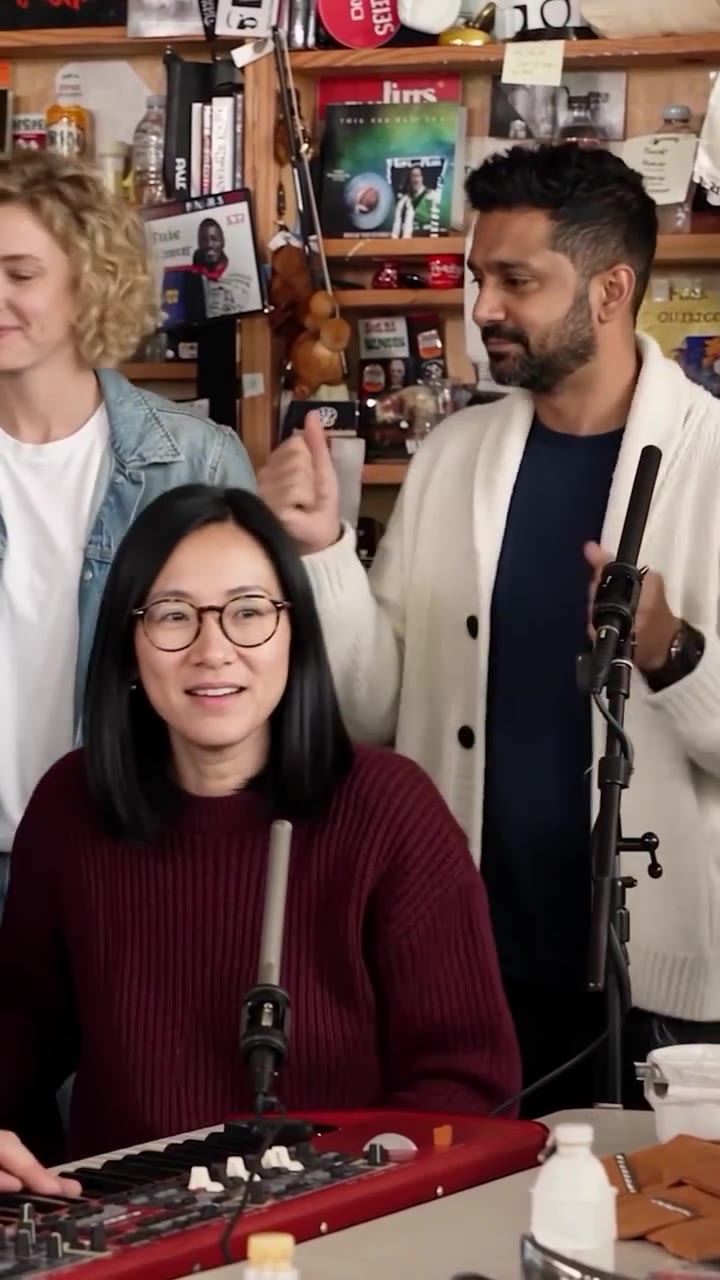
The Outstanding Tiny Desk AI template is the vertical cut of the viral desk concert clip: about 14 seconds in three shots. The band shot comes first, then a six-second close-up of the lead singer, then the saxophone solo. On ZapVid your photo becomes the lead singer and up to four friend photos become the keyboard player, the sax player and the two backup singers. You upload photos and press Generate in the Outstanding Tiny Desk AI Video Generator. You don't need CapCut, a prompt or an editing app.
What are the shots in the Tiny Desk template?
| Time | Shot | Who is on screen |
|---|---|---|
| 0:00 to 0:05 | Band | The keyboard player at the red keyboard, with the two backup singers standing behind |
| 0:05 to 0:11 | Big grin | The lead singer in close-up, singing and laughing |
| 0:11 to 0:14 | Sax solo | The saxophone player in close-up |
The lead singer only shows up in the close-up. The band shot never shows a second copy of you, and you get the middle six seconds of the video to yourself.
Which spot should each friend take?
Your photo always sings lead. For each friend you tap the spot you want: keys, sax, back left or back right. You can skip any of them.
- Lead singer: the person the video is about. It's the longest and closest shot, so use your sharpest, best-lit photo.
- Keys: front row in the band shot, the biggest face in the first five seconds. Good for your second-funniest friend.
- Sax: the solo close-up at the end. Use a sharp photo here too, since the camera is close.
- Back left and back right: smaller, standing behind the keyboard. Anyone works here, including friends with only an average photo.
Clothes come from each photo, so a friend in a hoodie plays keys in a hoodie. Plain clothes look cleaner than big logos or prints.
Do I have to fill all five spots?
No. Any spot without a photo keeps the musician from the original clip. With one photo you sing lead and the rest of the band stays as it was. The price is the same for 1 to 5 people: 100 credits, and a 100-credit pack costs $9.99.
CapCut template or AI template?
| CapCut-style template | ZapVid AI template | |
|---|---|---|
| Cuts and timing | Yes | Yes |
| Your face singing in the performance | No, photos go on top of the clip | Yes, the AI puts each person into the shots they appear in |
| People in the band | Depends on the template | 1 to 5, same price |
| Editing | You edit in the app | None. Upload photos, then download |
| Song | Often included | Not in the file. You add the official sound when you post |
| Price | Free | 100 credits per video ($9.99 for 100) |
A video editor template is free, but it can only lay your photo over the original. The AI template rebuilds every frame with your face, hair and clothes in the band, so the singing and the grin are yours.
How long does the AI template take?
Most videos are ready in 6 to 10 minutes after you press Generate. You can leave the page while it renders, and the video waits in your account.
Can I change the song or the cuts?
No. The template keeps the viral cut, since that's what people recognize when they scroll. You choose who is in the band. The file has no sound, so you pick the "Outstanding" sound in TikTok or Instagram Reels when you post.
What if a friend doesn't look right?
AI results vary. A friend may look a bit different from their photo, and two friends who look alike can merge into one. A sharp, front-facing photo of one person with nothing covering the face gives the best result. If a video fails, the credits come back to your account automatically.
More Tiny Desk AI guides
- The Outstanding Tiny Desk meme, explained: the concert, the song and the AI coaches edit.
- How to make the Outstanding Tiny Desk AI video: step by step, with photo tips.
- Is there a free Tiny Desk AI generator?: free options and 8 tools compared on price.
- Tiny Desk AI meme ideas: who to put in your band.
FAQ
Is the Outstanding Tiny Desk AI template free? No. Each video runs on a paid AI video model and uses 100 credits, and a 100-credit pack costs $9.99. Free editor templates give you the cuts, but they can't put your face into the performance.
How long is the Tiny Desk AI template? About 14 seconds, vertical 9:16, in three shots: the band, the lead singer close-up and the sax solo.
Who should go on lead vocals? The person the video is about. The lead singer gets the longest and closest shot, about six seconds of singing and grinning.
Can I fill only some of the spots? Yes. Add 1 to 5 photos. Empty spots keep the musicians from the original clip, and the price stays the same.
Do I need CapCut or an editing app? No. Upload photos, press Generate, and download the MP4 when it's ready.
Can I use the credits on other templates? Yes. Credits are not tied to Tiny Desk, they never expire, and you can spend leftover credits on any other template.